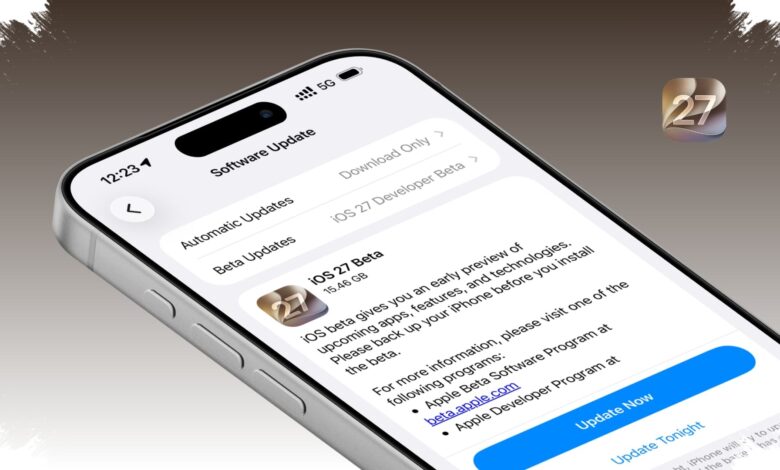
Apple has opened access to the iOS 27 Public Beta, giving iPhone users an early look at the next major update before its final release. The rollout matters most for owners of compatible devices, but the most talked-about features will not reach every supported model.
The update can be installed on devices that already support iOS 26. That means the iPhone 11 and newer qualify, along with the second-generation iPhone SE and later models.
Which iPhones Are Eligible
Compatibility is broad, but feature access is not equal across the lineup. Apple’s own beta rollout leaves some of the most advanced capabilities reserved for newer hardware.
| iPhone Model | iOS 27 Public Beta Support | Feature Notes |
|---|---|---|
| iPhone 11 series | Yes | Not all new features are available |
| iPhone 12 series | Yes | Not all new features are available |
| iPhone 13 series | Yes | Not all new features are available |
| iPhone 14 series | Yes | Not all new features are available |
| iPhone 15 series | Yes | Not all new features are available |
| iPhone 16 series | Yes | Not all new features are available |
| iPhone 17 series | Yes | Not all new features are available |
| iPhone SE 2nd generation and later | Yes | Not all new features are available |
The biggest limitation concerns Apple Intelligence. Siri AI and other AI-based functions are said to work only on the iPhone 15 Pro and newer variants.
Some on-device AI features go even further, with availability reportedly limited to the iPhone 17 Pro, iPhone 17 Pro Max, and iPhone Air.
How to Install the Beta
Apple recommends backing up the iPhone before installing the beta. Users must also enroll their Apple account in the Apple Beta Software Program through beta.apple.com.
After that, the installation path is straightforward through Settings. Go to General, then Software Update, select Beta Updates, and choose iOS 27 Public Beta before returning to Software Update to download the build.
- Back up the iPhone first.
- Enroll the Apple account in the Apple Beta Software Program at beta.apple.com.
- Open Settings > General > Software Update.
- Tap Beta Updates and choose iOS 27 Public Beta.
- Return to Software Update and download the available update.
Apple warns that beta software can still bring bugs, slower performance, and higher battery drain than the final version. The public beta is also expected to keep changing throughout the summer period from June to August 2026.
What Stands Out in iOS 27
Siri AI is one of the headline additions in iOS 27. Built on the latest Apple Intelligence system, it is designed to maintain an ongoing conversation without requiring users to repeat the earlier context.
Apple says the assistant can also understand what is shown on screen and access personal data from apps such as Calendar, Mail, Notes, and Photos. A separate Siri app is also included to store conversation history, which is synchronized privately through iCloud.
Beyond Siri, iOS 27 brings refinements to the Liquid Glass design. According to tekno.kompas.com, drawing on information from 9to5Mac, the update makes buttons, icons, and text easier to read and adds a new slider for adjusting transparency in the Appearance menu.
Safari is getting AI-powered tools as well, including tab grouping by topic, monitoring for changes on web pages, and extension creation through natural-language commands. The Photos app also gains three editing tools: Clean Up, Extend, and Spatial Reframing.
Apple says the update can make apps open up to 30 percent faster. AirDrop transfers are said to be up to 80 percent faster, while new photos may appear in Photos up to 70 percent sooner.
Screen Time and parental controls are also receiving major changes. Parents can set app limits by category, create different usage schedules, and track a child’s activity through a new dashboard.
Communication Safety has been expanded too, moving beyond nudity detection to identify blood and violent content as well.
For users with compatible iPhones, the beta offers an early look at a broad update that mixes interface changes, AI tools, and family controls. The catch is that the most advanced experiences remain tied to the newest devices, especially when Apple Intelligence is involved.