


A phone that feels sluggish is not always nearing the end of its life. In many cases, the real cause is far simpler: cache that has piled up and started to consume storage, make apps work harder, and slow down everyday use.
Cache is temporary data saved by apps or the system so websites and applications can open faster. But when it accumulates too much, the device can feel crowded, response times can drop, and some apps may become more likely to crash or force close.
Why cache deserves attention
Clearing cache is different from deleting app data. This step only removes temporary files, while photos, videos, contacts, and login accounts remain safe on the device.
The system will also rebuild cache when apps are used again, which makes this a practical and low-risk maintenance step. For that reason, cache cleaning is often used as a quick way to keep a phone stable without complicated procedures.
Android users can start with app-by-app cleanup
One of the most effective ways to reduce cache is to clear it from individual apps, especially those that store a lot of temporary data. This approach is useful for frequently used apps such as WhatsApp, TikTok, Instagram, and games.
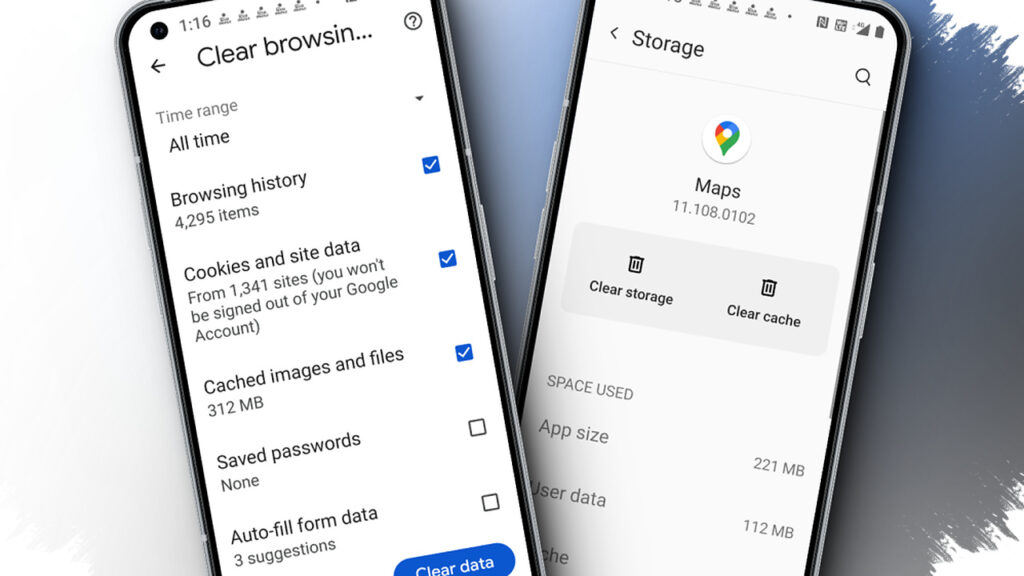
The path is usually found through Settings, then Apps or App Management. After selecting the app, open Storage or Storage & Cache, then tap Clear Cache.
Chrome often stores more than expected
Browser cache can make web activity feel heavier than usual, even when the phone itself is not the only problem. Chrome allows cleanup without removing passwords, as long as other options are not selected.
Open Chrome, tap the three-dot icon in the top right corner, then go to History and choose Clear browsing data. After selecting a time range, check Cached images and files, then tap Delete data.
Built-in tools on Samsung, Oppo, Vivo, and Xiaomi also help
Several phone brands include system tools that can remove junk files and cached data more quickly. On Samsung devices, Device Care or Battery and Device Care can be used to check storage and clear files with the Clean now option.
For app-specific cache on Samsung, users can still go through Apps, choose the app, open Storage, and tap Clear Cache. In some cases, deeper cleanup is also available through Recovery Mode.
Oppo users can find similar options through App Management or built-in maintenance tools such as Phone Manager. In ColorOS, the process generally starts from Settings, then App Management, followed by choosing the app and opening Storage to clear cache, or using Phone Manager to select Clean memory.
Vivo offers iManager or Phone Manager as a way to remove cache, junk, and unused files. From iManager, choose Space Cleaner and tap Clean now, while app-specific cache can still be cleared through Settings, Apps and Permissions, Manage Apps, then the app’s Storage menu.
Xiaomi also provides a built-in Security app that scans for cache and temporary files. Users can open Settings, go to Apps, then Manage Apps to clear cache for specific apps, or use Security, select Cleaner, and tap Clean now.
iPhone handles cache differently
iPhone users do not have a single button to clear all app cache at once. Safari, however, can be cleaned directly through Settings.
Open Settings, select Safari, then tap Clear History and Website Data. This removes browsing history, cookies, and stored site data from Safari.
A second option is available through iPhone Storage for reducing cache tied to larger apps. Open Settings, go to General, then iPhone Storage, select an app, and choose Offload App to remove the app while keeping its data, or Delete App to clear it completely.
When cache should actually be cleared
Cache does not need to be removed every day because it exists to speed up access. Cleaning becomes more relevant when storage feels full without large files, apps open slowly, apps fail more often, or the system has just finished an operating system update.
For heavy social media, gaming, or streaming use, clearing cache once a month is often enough to help keep performance lighter. Built-in cleaning features are also generally preferred over unnecessary third-party apps, since extra apps can add memory load and raise privacy concerns.