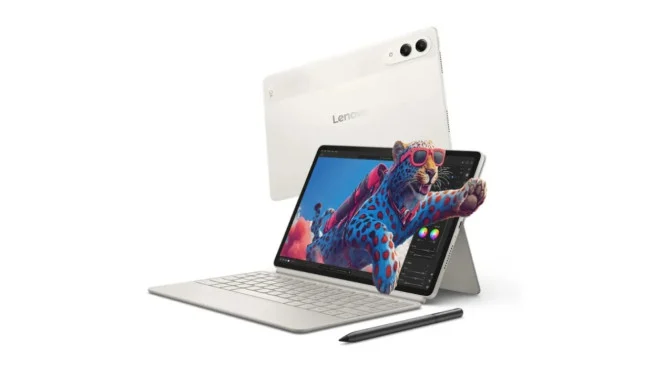
Lenovo Yoga Tab is being positioned as more than a premium tablet. It is designed to handle work in a compact form, while still arriving with the kind of accessories that make it ready for productivity from the start.
That approach matters because the package already includes a Lenovo Tab Pen Pro and a magnetic keyboard case with a trackpad. With a price of Rp10.999.000, users do not need to buy those essentials separately before turning the tablet into a work device.
A tablet that shifts into PC-like use


Once the keyboard is attached, Lenovo Yoga Tab automatically enters PC Mode. The interface changes into a desktop-style layout with a taskbar at the bottom, smoother split-screen handling, and app windows that can be resized freely.
This makes the tablet feel much closer to a computer than a typical slate. For people who move between locations often, that setup offers a more comfortable way to type, manage documents, and keep several apps open at the same time.
The stylus is built for more than notes
The Lenovo Tab Pen Pro is a central part of the package, not just an optional accessory. It supports 8,192 pressure levels, wireless magnetic charging, and palm rejection for more precise writing and drawing.
It also adds two functions that widen its use. Haptic feedback gives a subtle vibration when it touches the screen to make writing feel closer to paper, while another function lets it work as a red laser pointer or a presentation remote for switching slides with an air swipe.
AI tools focused on everyday productivity
Lenovo has built five AI features into Yoga Tab for productivity use. The most notable is AI Live Transcript, which can record meetings or lectures and convert the speaker’s voice into text in real time.
The other AI tools are aimed at quick daily tasks. Sketch to Image turns rough sketches into cleaner digital images, while Smart & Circle Capture helps select photo objects accurately so they can be inserted into Notepad.
Two more features expand the work use case. AI Super Resolution can sharpen blurry or low-resolution images up to 4K, and Smart AI Input helps draft formal emails or messages without third-party apps.
Still built for entertainment
Yoga Tab is not limited to work functions. It also comes with a 3.2K display and a quad-speaker audio system, which keep it attractive for watching films or playing demanding games.
That combination strengthens its position as a versatile device rather than a work-only tablet. Users who want one device for both productivity and entertainment get added value from the visual and audio quality on offer.
Who it suits best
The tablet is most relevant for creative workers, students, and executives with high mobility. It is also suitable for people who often use Google Docs or Sheets, want a lightweight companion device, and value premium multimedia playback.
At the same time, it is not the strongest option for heavy Microsoft Office users. It is also less suitable for those who need large external storage through MicroSD, so work needs should be considered before choosing it.
Lenovo Yoga Tab shows how a modern tablet can move closer to laptop-like function without losing portability. With PC Mode, a capable stylus, and AI Live Transcript, it offers a flexible way to work from campus, the office, or anywhere in between.