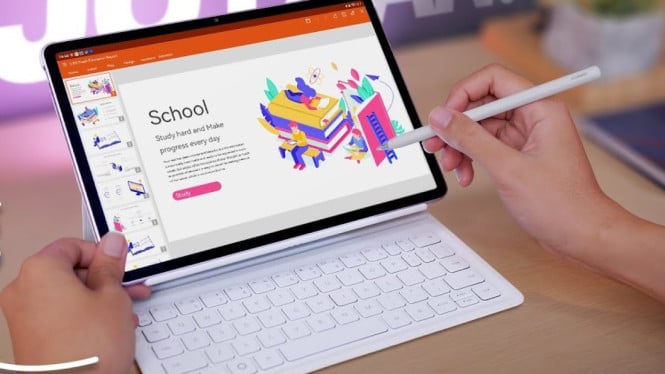
Huawei MatePad 11.5 emerges as a highly affordable work tablet, packaged with a keyboard and stylus pen. Priced under $400, this tablet targets students, professionals, and online entrepreneurs seeking a portable productivity device. Its capability to run office applications similar to a Windows laptop with longer battery life makes it a practical choice for everyday tasks.
The design of the MatePad 11.5 impresses with a slim 6.1-millimeter profile, making it easy to carry around. Its 2.5K resolution screen features a matte paper-like finish that reduces glare and fingerprints, especially useful for working in bright environments such as cafes. This premium finishing is eye-catching in the entry-level tablet segment.
Performance and Productivity Features
What sets this tablet apart is its inclusion of a PC-level WPS Office suite free of charge. Users can handle Word documents, PowerPoint presentations, and Excel spreadsheets with advanced features like comprehensive toolbars, PowerPoint animations, and pivot table support on Excel. Cloud storage integration with Google Drive and others enables seamless file access, enhancing mobility and workflow. The detachable keyboard connects via Bluetooth and pairs automatically, facilitating efficient typing anywhere.
Stylus Support and Creative Software
The Huawei M Pencil (3rd generation) stylus magnetically attaches and charges wirelessly on the device. Free software tools like Huawei Notes help with note-taking during lectures or meetings. For creatives, the tablet offers GoPaint, a diverse drawing app supporting 4K canvas resolution, multiplayer modes, textures, smart selections, and instant shapes. Unlike many competitors, these features and apps are included without a subscription fee.
Battery Life and Multimedia Experience
Equipped with a 10,100 mAh battery, the MatePad 11.5 can last up to two days depending on usage. Its display’s 120Hz refresh rate ensures smooth scrolling and screen interactions. The audio experience is enhanced by four speakers delivering crisp and powerful sound, ideal for watching movies or gaming. Gaming performance supports titles like Pokémon Unite with stable frame rates and clear audio output.
App Ecosystem and Compatibility
Users can install Google applications through Huawei’s AppGallery with just one extra step, similar to iPads lacking native Google support. Compared to the iPad Air, the MatePad 11.5 outshines with its paper matte screen, included keyboard case, free stylus, and bundled productivity software. These advantages come without additional costs, providing strong value for money.
Ideal User Profiles and Practicality
This tablet meets the needs of a broad audience: college students benefit from extensive note-taking options, office workers enjoy full-featured office apps, and small business owners can respond to clients comfortably using the included keyboard. Weighing only about 0.5 kilograms, the MatePad, along with the case and keyboard, remains under 1 kilogram, ensuring easy portability.
For users requiring standard office functions and apps, the MatePad 11.5 offers better value compared to similarly priced laptops. However, specialized software like SPSS still necessitates a traditional laptop. Overall, the Huawei MatePad 11.5 presents an excellent budget-friendly tablet solution for productivity combined with creative versatility.