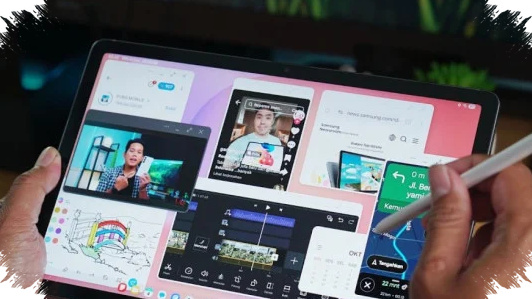
Samsung has pushed the Galaxy Tab S10 Lite into the entry-level tablet market with a clear message: you may not need a laptop for school, note-taking, or light creative work. The device arrives with Samsung’s S Pen in the box, AI writing tools, and a price point positioned around the $250–$280 range, depending on the market.
That combination makes the tablet stand out immediately, especially for students who want a large screen, stylus input, and enough performance for everyday productivity. In a category where many brands sell the tablet first and the accessories later, Samsung’s decision to include the S Pen changes the value equation in a meaningful way.
A more polished “Lite” tablet than expected
Samsung usually uses the “Lite” label to signal a more affordable version of a premium device, but the Galaxy Tab S10 Lite does not look cheaply made. It uses an aluminum frame and an aluminum back, which gives it a more refined feel than many tablets in the same price class.
The body is also thin at 6.6 mm, which helps when carrying it in a backpack or using it with one hand for long periods. Samsung also offers a Coral color option that gives the tablet a fresher look than the usual black or gray finishes that dominate this segment.
Display tuned for everyday visibility
The tablet does not use an OLED panel, and that is one of the clearest compromises Samsung has made here. Instead, it relies on a TFT display, which is less premium in contrast and deep blacks, but still aims to stay practical for daytime use.
Samsung says the panel reaches close to 500 nits of brightness, which should help keep text readable under strong indoor light and even in bright outdoor shade. It does not include an anti-reflective coating, so glare may still be noticeable, but the brightness level helps soften that limitation in real use.
AI features that matter more than marketing
The most interesting part of the Galaxy Tab S10 Lite is not the hardware alone, but how Samsung uses AI to support study and productivity habits. The company built two headline tools into the tablet that target students directly.
- Math Solver lets users write equations in Samsung Notes with the S Pen and receive an instant answer.
- Handwriting Help cleans up messy handwriting and turns it into neater, more readable notes automatically.
These functions are not just gimmicks. They can save time during lectures, homework sessions, and brainstorming work, especially for students who prefer handwriting over typing on a keyboard.
Samsung also adds Circle to Search and Gemini integration, giving users a faster way to search for information without switching apps repeatedly. That matters on tablets because multitasking often depends on avoiding unnecessary taps and app jumps.
The S Pen changes the real value
The biggest practical advantage of the Galaxy Tab S10 Lite is that the S Pen comes included in the box. On many competing tablets, the stylus costs extra, which increases the real purchase price and can make the device feel less affordable than the headline spec sheet suggests.
For students, this matters because note-taking, sketching, annotating PDFs, and solving equations all work better with a stylus. Samsung’s decision makes the tablet ready to use right away, without forcing buyers to budget for a separate accessory before they can get the full experience.
Performance is enough for school and casual gaming
Under the hood, the Galaxy Tab S10 Lite uses the Exynos 1380 chipset paired with 6 GB of RAM. That is not flagship territory, but it is a sensible setup for browsing, note-taking, video streaming, document editing, and light creative work.
In benchmark testing with AnTuTu version 11, the tablet reportedly scored around 750,000 points, which suggests stable midrange performance for its class. Real-world gaming results also paint a positive picture, especially for a tablet that aims to stay affordable.
| Game | Reported Result |
|---|---|
| Mobile Legends | Around 59 FPS average |
| PUBG Mobile | Around 58–60 FPS stable |
| Genshin Impact | Around 48 FPS on lowest settings |
Those numbers show that the tablet can handle popular mobile games better than many budget tablets, though heavy titles still require lower graphics settings. Heat management also appears reasonable in the reported tests, which is important for long study and gaming sessions.
Battery life and charging stay practical, not flashy
Samsung equips the Galaxy Tab S10 Lite with an 8,000 mAh battery, a capacity that should support a full day of moderate use in many scenarios. That includes classes, note storage, video playback, and web browsing, all of which are common tablet workloads.
The trade-off comes in charging speed, which tops out at 25W. That is acceptable for a tablet battery of this size, but it is not especially fast, and Samsung does not include a charger in the box based on the reference information.
What the Tab S10 Lite does well
The Galaxy Tab S10 Lite gets several basics right, and those basics matter when buyers compare tablets in this price bracket. It combines a thin aluminum body, included stylus support, and AI-powered note tools in a package that feels designed for real productivity rather than spec-sheet hype.
Its strongest advantage is that it can work as a digital notebook, a study companion, and a casual entertainment device at the same time. For users who do not need desktop-grade software, that flexibility can reduce the need to carry a laptop for everyday tasks.
Main limitations buyers should know
The tablet still has a few clear compromises that buyers should understand before choosing it. The TFT panel is less premium than OLED, the charger is sold separately, and the 25W charging speed is modest for an 8,000 mAh battery.
These limits do not make the device weak, but they do define its position. Samsung is targeting users who want a balanced tablet experience with stylus support and AI features, not buyers who prioritize the most advanced display or the fastest charging available.
Who this tablet is really for
The Galaxy Tab S10 Lite makes the most sense for students, office users with light workloads, and creative users who depend on handwritten notes. It is also relevant for parents looking for a practical tablet for school-age children, as long as they value durability, stylus input, and simple AI tools.
For someone who mainly wants to read, annotate, search, and take notes, this tablet can cover a large part of the job a laptop would normally do. For heavier workflows such as video editing, desktop-style multitasking, or advanced design software, it still sits below the level of a true laptop replacement.