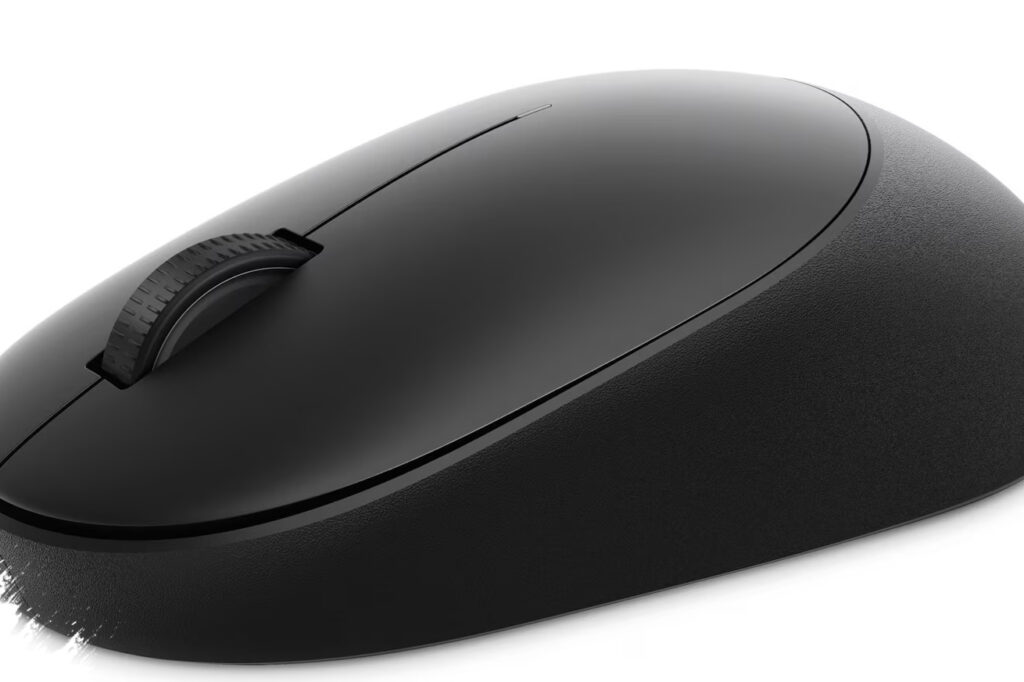
Dell has officially introduced the Pro 5 Wired Fingerprint ESS Mouse, model MS526C, a business-focused input device that combines everyday navigation with biometric login support. The key selling point is simple: the mouse doubles as a fingerprint reader, giving users a faster and more secure way to access Windows devices.
The product is aimed at modern office workflows where speed, security, and convenience matter at the same time. By placing fingerprint authentication directly on the mouse body, Dell removes one more step from the login process and makes biometric access available at the point where users already interact with their PC.
A mouse built for secure workplace login
Dell’s approach with the Pro 5 Wired Fingerprint ESS Mouse reflects a broader shift in enterprise peripherals. Instead of treating the mouse as a basic accessory, the company has turned it into a security tool that supports Windows Hello integration.
That means users can sign in with a fingerprint rather than typing a password manually. In shared office environments, this can reduce friction during login while also helping limit the risks that come with password reuse, weak credentials, or shoulder-surfing.
The fingerprint sensor is embedded into the mouse body near the scroll wheel, making it easy to reach without changing how the mouse is normally used. This placement matters because it keeps the biometric function accessible while preserving the familiar shape and workflow of a standard office mouse.
Key features that set the Dell Pro 5 apart
The MS526C is not just about security. Dell also equipped it with a 6,000 DPI optical sensor, which gives users a wide range of sensitivity options for different tasks.
For office work, the higher precision can help with document handling and productivity apps. For design-related tasks or more detailed cursor control, adjustable sensitivity adds flexibility that many business users will appreciate.
The mouse also uses an ambidextrous design, so it should feel comfortable for both right-handed and left-handed users. At around 72.9 grams, it stays relatively light, which is helpful for long work sessions.
Important specifications at a glance
- Fingerprint sensor integrated into the mouse body
- Windows Hello support for biometric sign-in
- 6,000 DPI optical sensor
- Ambidextrous shape for left- and right-handed users
- Weight of about 72.9 grams
- USB-A wired connection with a 1.8-meter cable
The wired design is another deliberate choice. Dell did not add Bluetooth or wireless support here, and that may actually appeal to IT teams and office users who prioritize reliability over mobility.
A cable connection reduces the chance of signal interference and removes battery management from the equation. For fixed workstations, that can be a practical advantage, especially in environments where stable operation matters more than cable-free convenience.
Why the fingerprint feature matters for business users
Biometric authentication has become more common across laptops, smartphones, and enterprise systems. Dell’s move to place fingerprint security inside a mouse shows how peripheral design is evolving to support faster authentication without requiring a separate accessory.
This can be useful in office setups where multiple people share desks across shifts or where security policy requires frequent sign-ins. Instead of reaching for a keyboard or relying on a password manager, users can authenticate with a single touch on the mouse they already hold.
That small change can improve workflow efficiency in everyday use. It also fits the growing demand for hardware that blends productivity tools with built-in security features.
How it compares with typical office mice
Most office mice focus on comfort, battery life, and quiet operation. The Dell Pro 5 adds a different layer by combining those basic expectations with enterprise-grade authentication.
Here is a simple comparison:
| Feature | Typical Office Mouse | Dell Pro 5 Wired Fingerprint ESS Mouse |
|---|---|---|
| Authentication | None | Fingerprint sensor |
| Connectivity | Wired or wireless | Wired USB-A |
| Target use | General productivity | Security-focused business use |
| DPI range | Often basic | Up to 6,000 DPI |
| Ambidextrous design | Sometimes | Yes |
That positioning makes the MS526C more specialized than a standard office mouse. It is designed for users who want secure login access built into an everyday peripheral rather than added separately.
Pricing and market positioning
Dell lists the mouse at about $44.99, which places it in a relatively affordable business peripheral category. For organizations or professionals who value biometric convenience, that price may be easier to justify than buying a separate authentication device.
The pricing also suggests Dell wants to make fingerprint-based access more accessible to mainstream business users, not just premium IT environments. That matters because enterprise security tools often become more widely used when they are simple to deploy and reasonably priced.
Dell also introduced other peripherals in the Pro lineup, including Pro 7 wireless keyboard and mouse products. Those devices are aimed at users who want more flexibility and battery-powered convenience, while the Pro 5 Wired Fingerprint ESS Mouse stays focused on dependable wired performance and security.
What buyers should know before choosing it
- It is best suited for desktop or fixed workstation use.
- It is useful for people who sign in frequently and want faster access.
- It may appeal to IT departments looking for simple biometric deployment.
- It is not ideal if wireless freedom is the top priority.
- Its value is strongest in security-conscious office settings.
Dell’s latest mouse stands out because it treats authentication as part of the pointing device rather than a separate part of the setup. For professionals who want faster login, consistent wired connectivity, and a compact form factor with biometric convenience, the Pro 5 Wired Fingerprint ESS Mouse offers a practical new option in the growing market for smarter workplace peripherals.