


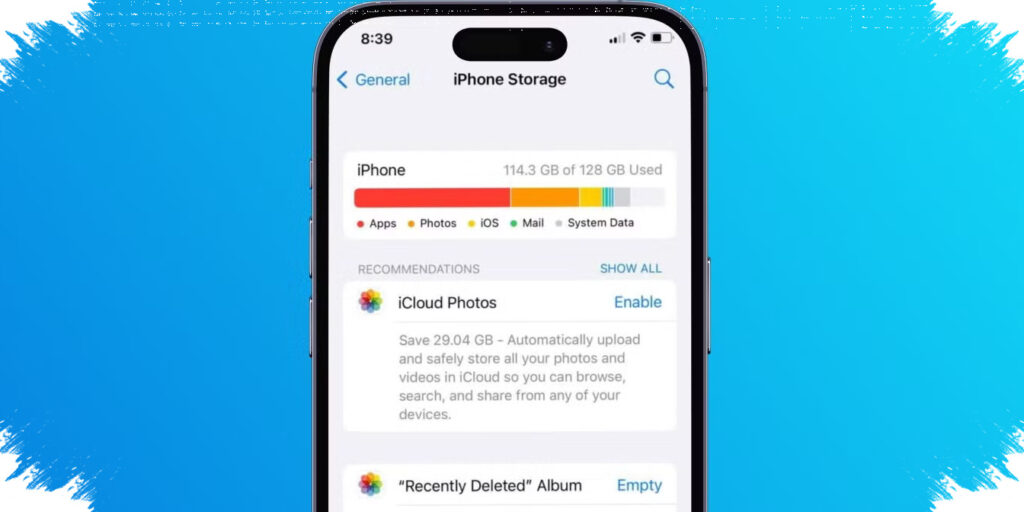
Many smartphone users are surprised when internal storage fills up quickly even though they rarely install new apps. The main reason is often not the number of apps on the home screen, but the steady buildup of hidden data from everyday use.
On Android and iPhone devices, storage is constantly consumed by caches, chat media, offline downloads, system files, and app updates. These items grow quietly in the background, so the phone can feel full even when the app list looks unchanged.
Why storage fills up without obvious new installations
The biggest misunderstanding is that free space only shrinks when new apps are downloaded. In reality, the operating system and existing apps keep creating data every day, especially on phones used for messaging, social media, web browsing, and video streaming.
Many of these files are not visible at first glance. They sit inside app folders, temporary storage, or system directories, which makes the phone seem normal until warnings about low storage suddenly appear.
Cache is often the first hidden culprit
Cache stores temporary data so apps can load faster. Social media apps, browsers, and streaming platforms use it heavily because they need to display photos, videos, and pages quickly.
That convenience comes at a cost. Cache can grow into hundreds of megabytes or more, even if no files were deliberately downloaded.
Here are the most common storage drains found on smartphones:
- App cache that keeps expanding over time.
- Photos and videos sent through chat apps.
- App updates that make installed apps larger.
- Hidden system files and logs.
- Offline downloads from music and video platforms.
Chat apps can quietly fill the gallery
Messaging apps are another major source of storage loss. Many of them automatically save received photos and videos into the phone’s gallery or download folders.
This becomes a bigger problem in active group chats, where dozens of media files can arrive every day. If auto-download stays on, the phone can store every image, sticker, clip, and forwarded video without much warning.
Over several months, these files can consume several gigabytes. Users usually notice only after the device slows down or starts refusing new downloads.
App updates make old apps heavier
A phone may not have many new apps, but existing apps often grow after repeated updates. Developers add features, improve performance, and install new resources, and all of that increases storage use.
The result is simple: an app that once felt light can become much larger after several update cycles. This effect is stronger on devices with limited internal storage, where even moderate growth can create pressure quickly.
System files also take space in the background
The operating system itself stores logs, temporary components, and other internal data to keep the phone stable. These files are not always visible to standard users, but they still occupy storage.
After a major system update, some leftover files may also remain on the device. Support material from the reference article explains that hidden system data can slowly reduce available capacity, even when photos and app counts do not appear to change much.
Offline downloads from entertainment apps add up fast
Music and video apps often keep offline content on the device. Songs, episodes, films, and saved playlists remain stored until they are removed manually.
Streaming apps also use buffering data to make playback smoother. If the app is used often, that temporary data can add another layer of storage demand.
A quick check in the phone’s storage menu usually reveals which category consumes the most space. In many cases, the real problem is not one large file, but a combined buildup of small files scattered across several apps.
What users can check first
A simple storage review can help identify the main cause before deleting important content. This is the most practical order to inspect:
| Priority | What to check | Why it matters |
|---|---|---|
| 1 | App cache | Usually grows silently and fast |
| 2 | Chat media | Often stored automatically in large numbers |
| 3 | Offline downloads | Can stay on the device for months |
| 4 | App size after updates | Existing apps may become much heavier |
| 5 | System and hidden files | Consumes space without being obvious |
Clearing cache regularly, turning off auto-download in chat apps, and moving important photos or videos to cloud storage or a computer can free significant space. Deleting duplicate files and removing old offline downloads also helps reduce unnecessary pressure on internal memory.
For many users, a full phone is not a sign of excessive app installation. It is usually the result of daily digital habits that keep producing data in the background, quietly shrinking available storage until the device finally feels crowded.