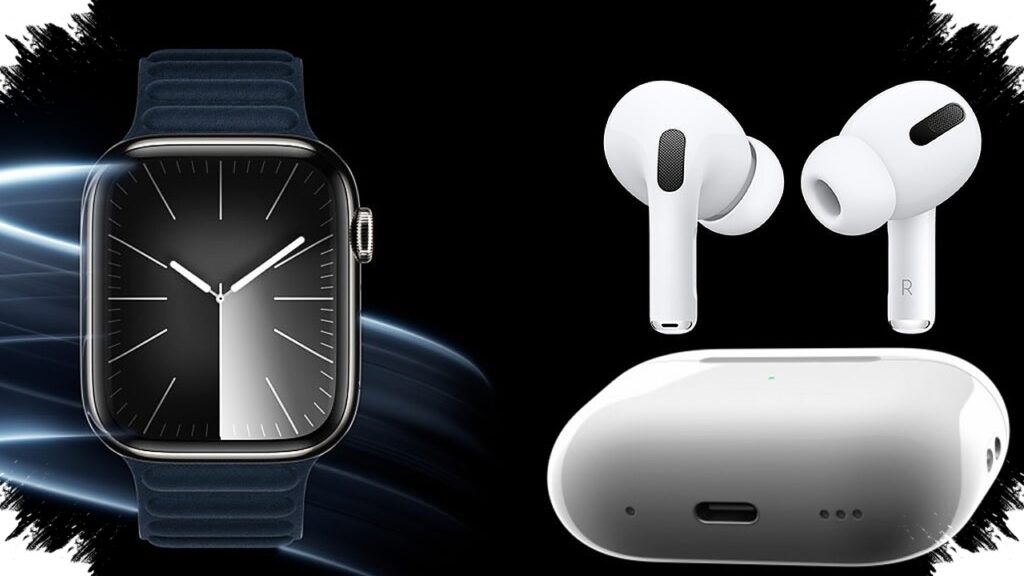
For runners, gym-goers, and anyone who trains alone, Apple Watch and AirPods Pro now offer more than convenience. Used together, they can help structure workouts, monitor body response, manage audio, and add a layer of safety without forcing constant screen checks.
The strongest value comes from how closely the two devices work inside Apple’s ecosystem. With watchOS 11 and the audio controls on AirPods Pro, exercise routines can become more organized, more practical, and easier to track in real time.
A more flexible way to plan training
One of the simplest ways to make Apple Watch more useful is by adjusting Activity Rings to match daily conditions. The target does not have to stay fixed, since users can lower it on rest days or pause it during recovery periods.
That flexibility helps preserve consistency without pushing the body beyond its limits. For people who train regularly, it also keeps daily goals realistic instead of overly rigid.
Apple Watch also supports Custom Workout in the Workout app. This allows users to build their own session structure, from warm-up to the main workout and then cooldown, all in one sequence.
Once the workout is set, the watch guides transitions between segments through vibration or sound alerts. That makes it useful for time-based training that demands discipline without constant attention to the display.
Tracking effort and recovery more closely
Training effectiveness does not depend only on intensity. Recovery matters just as much, and Apple Watch includes Training Load to help users understand how exercise affects the body over time.
That data can show whether training volume still feels balanced or is starting to become too heavy. It is especially relevant for users preparing for a running race or another event that requires gradual progress.
The monitoring can be paired with Vitals and Sleep metrics. While the user sleeps, Apple Watch measures heart rate, respiratory rate, wrist temperature, and blood oxygen level.
If the system detects an anomaly or the body has not fully recovered, it sends a notification. That information can help guide a lighter workout the next day and reduce the risk of overtraining.
AirPods Pro add focus, awareness, and heart-rate tracking
AirPods Pro play a different role during exercise, especially when the environment changes from one setting to another. Their noise control modes can be adjusted for either focus or safety.
Active Noise Cancellation is useful in a crowded gym because it reduces surrounding noise. That makes it easier to stay focused during strength sessions or other concentrated workouts.
Transparency Mode is better for running or cycling outdoors, where environmental awareness matters. It allows sounds such as horns and nearby activity to remain audible, helping users stay alert.
There is also Adaptive Audio, which automatically balances ANC and Transparency based on real-time noise conditions. This is practical for users who move between quiet and busy spaces and do not want to switch modes manually.
One of the most notable exercise features is heart-rate tracking through AirPods Pro 3. During a workout, real-time heart-rate data can be viewed in the Fitness app on iPhone.
That gives users an immediate picture of workout intensity. It also reduces the need to keep looking at Apple Watch on the wrist just to check how the body is responding mid-session.
Useful for solo outdoor sessions and workout documentation
Real-time data is especially helpful for people who run long distances or cycle alone. It makes it easier to adjust pace when the body starts to work too hard or when intensity still has not reached the desired level.
Apple Watch also includes Check In for solo outdoor activity. This safety feature can notify friends or family when a workout ends or when the user arrives safely at a destination.
If something goes wrong and the user does not respond, the device can share location details with emergency contacts. That adds an important safeguard for outdoor exercise done alone.
After training, both Apple Watch and AirPods Pro can help document the session with little effort. The Camera Remote app on Apple Watch can act as a viewfinder to frame an iPhone camera from a distance.
AirPods Pro 3 can also be used to control the camera. Users only need to press and hold the earbud stem to take a photo or start recording workout footage, making post-workout documentation more practical.