Valve’s Steam Controller is designed to do more than replace a standard PC gamepad. It aims to bring together the flexibility of a computer setup and the convenience of a console-style controller in a single device.
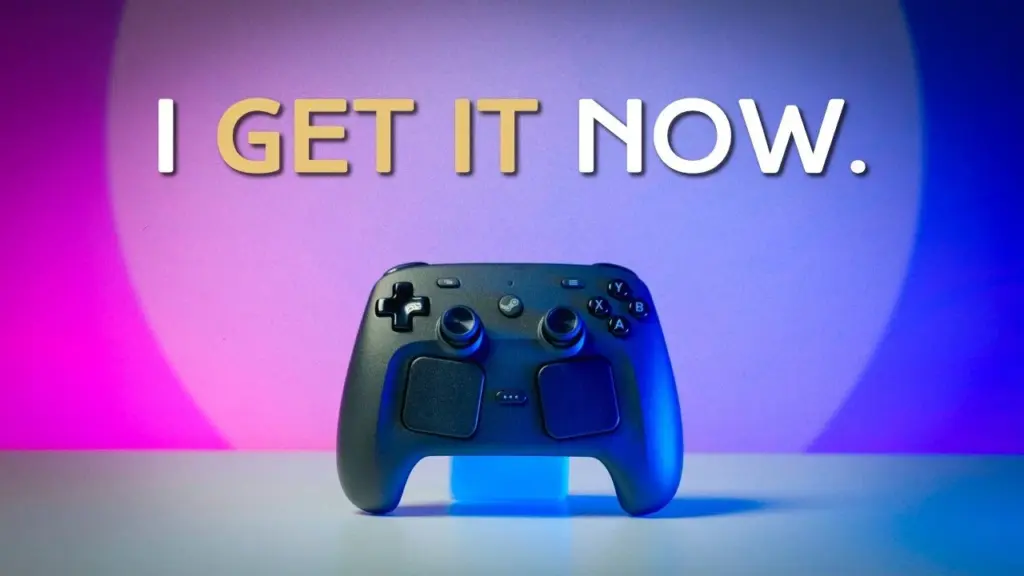
That goal is reflected in the hardware choices Valve made. The controller is slightly larger than an Xbox Series X controller, and its layout takes cues from the Steam Deck to prioritize long-term comfort, a premium feel, and durability.
A controller built around flexibility
Rather than relying on a conventional controller formula, Valve combines TMR magnetic thumbsticks, back buttons, trackpads, gyro support, and Steam Input. The magnetic thumbsticks are intended to provide smoother, more precise response while improving durability compared with traditional analog sticks.
The back buttons are positioned for easy access without affecting how the hands rest during play. That makes the controller more adaptable for different control schemes, especially for players who want extra input options without sacrificing comfort.
Trackpads remain the defining feature
The most recognizable part of Steam Controller is still its trackpad design. It carries forward an identity from earlier generations and is aimed at games that are often easier to handle with a mouse, especially strategy titles and first-person shooters.
In those genres, the trackpads can offer finer movement control and better aiming precision than a stick alone. At the same time, this feature is also the one most likely to divide opinion, since its usefulness depends heavily on the game and on how comfortable a player is with the control style.
Valve also includes gyro support to strengthen aiming precision in compatible games. In shooters and action titles that demand tighter control, gyro can help make movement and targeting feel more refined.
Steam Input sits at the center
The hardware is only part of the story. Steam Input is the system that gives the controller much of its appeal by allowing players to remap buttons, build per-game profiles, and tailor control setups to different genres.
That flexibility is a major advantage over typical console controllers. It allows the Steam Controller to adapt to the game instead of forcing every title into the same fixed layout, which is especially useful for players who like to fine-tune their input settings.
Valve also adds GripSense technology, which detects hand position to trigger customizable input. Even so, that feature still feels limited in this version and does not appear fully mature yet.
Designed for different play environments
Steam Controller is built to work across several setups. It supports USB-C for wired use, Bluetooth for wireless pairing, and 2.4 GHz wireless for a more traditional low-latency connection.
The 2.4 GHz mode uses the included puck, which serves as both a charging dock and a wireless receiver. That combination makes the controller practical for a desk setup or a living-room arrangement, depending on how the player wants to use it.
This broader compatibility fits Valve’s larger direction. Alongside Steam Deck, the controller points to an ecosystem meant to move smoothly between handheld play, desktop gaming, and TV-friendly use.
Strongest inside Steam, narrower outside it
The same Steam-first focus also defines its limits. The controller is most appealing to users already invested in Valve’s platform, especially on Windows and Linux, where Steam integration matters most.
Outside Steam, compatibility is described as more limited, particularly with other launchers and non-Steam platforms. macOS users also have fewer options, which means the experience is not equally strong across all computing environments.
Even so, the broader strategy is clear. Steam Controller reflects Valve’s effort to connect PC gaming convenience with console-like simplicity, while still keeping the customization that PC players expect.
Source: www.geeky-gadgets.com