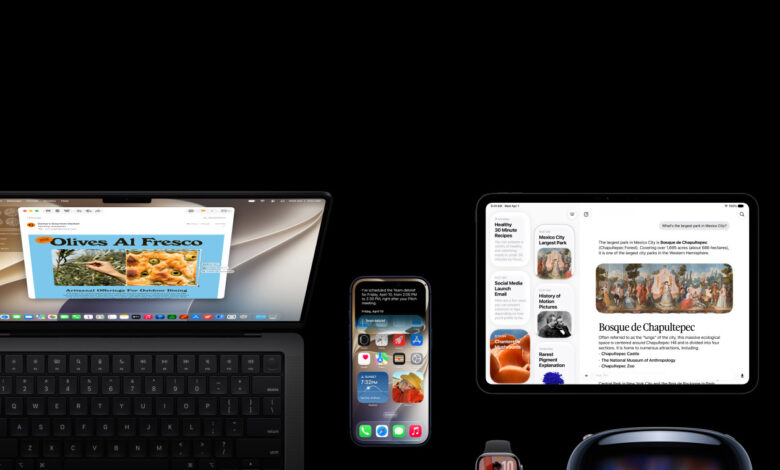
iPadOS 27 is shaping up as a major step in Apple’s effort to make the iPad feel more like a desktop-class device without losing its tablet identity. The update focuses less on visual novelty and more on the practical changes that matter to users who rely on iPad for work, file handling, and multitasking.
The most noticeable shift is how the system handles multiple tasks at once. Apple is adding a persistent menu bar, stronger window management, and support for resizable windows in apps that were originally built only for iPhone.
Multitasking gets a more desktop-like structure
Apple is sharpening the iPad’s productivity tools with a more mature windowing system. Users will have greater control over resizing apps and arranging their workspace, which makes the tablet easier to use in complex daily workflows.
The persistent menu bar is a notable addition because it gives faster access to core tools and controls. That design choice brings the interface closer to macOS and appears aimed at users who want quicker navigation while working.
Support for iPhone-only apps is also expanding in a practical way. In iPadOS 27, those apps can be resized into windows, making them easier to place alongside other apps on the larger iPad display.
This matters because the iPad has long sat between a content-consumption device and a work device. With more flexible window management, tasks such as research, creative projects, and everyday office work become easier to handle.
File transfers and sharing move faster
Performance updates are also part of the package, especially for users who move large files. Apple says transfer speeds to external drives can increase by up to five times, which is a significant change for workflows that depend on storage accessories.
The improvement is especially relevant for high-resolution media and large data sets. For professionals, shorter waiting times can make a measurable difference during active work sessions.
AirDrop is getting attention as well, with Apple improving the speed and reliability of wireless file sharing between Apple devices. That keeps it useful for quick exchanges in both casual and professional settings.
These changes are paired with broader system optimization intended to keep the iPad feeling smoother overall. Efficiency is clearly one of the main priorities in this release.
Siri becomes easier to keep open
Siri is also evolving into a more practical multitasking tool on the iPad. In iPadOS 27, it arrives with a dedicated app and expanded functions that make it easier to use while other work is still on screen.
The assistant can now run in a window or in Slide Over mode. That means users can interact with Siri without interrupting the main app they are using.
Apple has also added Siri conversation history. The feature makes it easier to continue previous requests, manage tasks, or revisit information that was already asked for earlier.
That approach suggests Siri is being positioned as more than a momentary voice command tool. On iPadOS 27, it is designed to stay present in the middle of an active multitasking session.
Shortcuts is better suited to keyboard workflows
Apple is also making Shortcuts more useful for people who switch between touch and keyboard input. A new automation trigger now works when a keyboard is connected or disconnected.
This allows users to automate actions such as opening a specific app or adjusting settings. It creates more personalized workflows based on how the device is being used at the moment.
The Shortcuts app itself has also been redesigned for easier navigation. A refreshed side menu and clearer detail views help users manage automations in a more organized way.
Combined, the new trigger and interface changes make Shortcuts more relevant for productivity-focused users. That is especially important for people who use the iPad in both tablet mode and laptop-like mode.
Search and interface details are being refined
iPadOS 27 also improves search across core apps. Results are said to appear faster and more accurately, helping users find files, messages, and other content with fewer steps.
That may sound less dramatic than the multitasking changes, but its impact is broad because search is used throughout daily activity. Faster discovery often translates into better efficiency on mobile devices.
Apple is also polishing parts of the interface for a more consistent systemwide feel. Apps such as Apple Home are being updated to align better with the broader design language of iPadOS 27.
Overall, the update appears aimed at two audiences at once. Casual users get a faster, cleaner system, while power users get stronger multitasking, improved file transfer, more capable Siri tools, and more useful automation.
| Feature Area | What Changes | Why It Matters |
|---|---|---|
| Multitasking | Persistent menu bar, better window management, resizable iPhone-only apps | Makes iPad feel more like a desktop for work |
| File Handling | Up to 5x faster transfer speeds to external drives | Speeds up large media and data workflows |
| AirDrop | Faster, more reliable device-to-device sharing | Improves everyday file exchange |
| Siri | Dedicated app, window or Slide Over support, conversation history | Lets Siri stay available without interrupting work |
| Shortcuts | New keyboard connect/disconnect trigger, redesigned navigation | Adds more flexible automation for hybrid workflows |
Apple’s direction with iPadOS 27 is clear: make the iPad more capable for demanding users while preserving the simplicity that defines the platform. The result is a release built around productivity, speed, and a more refined working experience on the larger screen.