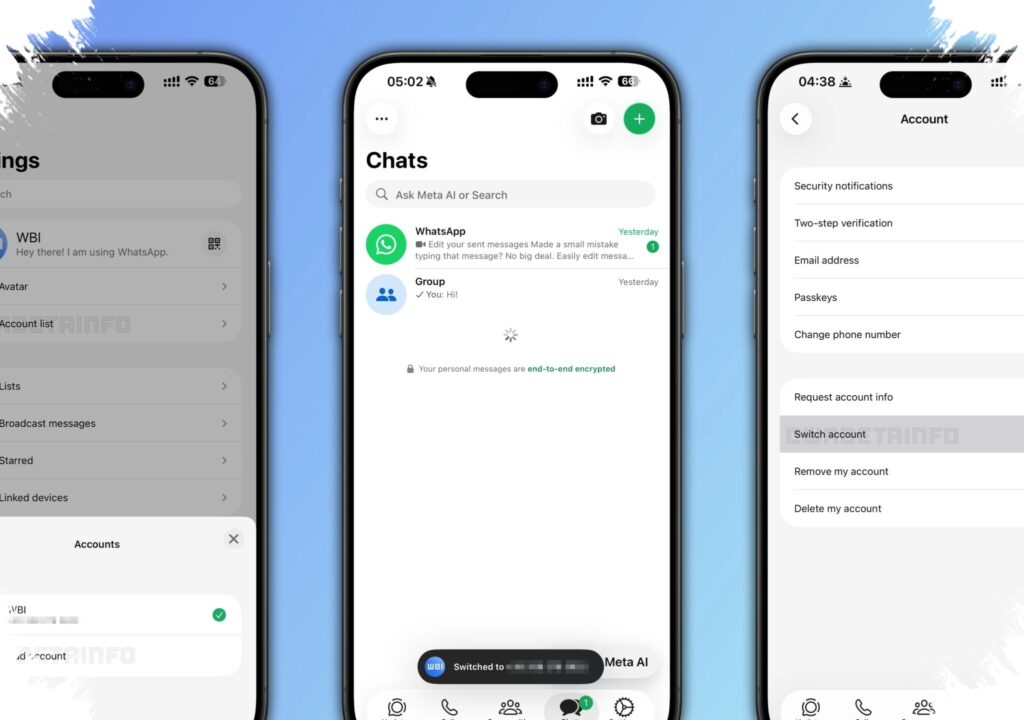
WhatsApp is no longer just a simple messaging tool for Android and iPhone users. The app is rolling out a set of new features that reshape how people switch accounts, move chat histories, manage storage, and use AI inside everyday conversations.
The changes are not arriving all at once, so the menu options may look different from one device to another. Even so, the direction is clear: WhatsApp is becoming more flexible, more efficient, and more closely tied to daily communication habits.
AI tools are moving deeper into WhatsApp
One of the most noticeable shifts is the growing role of Meta AI inside the app. WhatsApp now lets users edit photos directly in chat before sending them, which reduces the need to open a separate editing app.
The available tools include removing distracting objects, changing backgrounds, and adding visual effects. This makes photo sharing faster and keeps more of the workflow inside WhatsApp itself.
Writing help is built for faster replies
WhatsApp is also testing or introducing AI Writing Help to support replies. The feature is designed to help users respond more quickly, summarize long conversations, or shape a message into something cleaner and easier to send.
That does not mean every reply should be left to AI. The tool is meant to assist with speed and clarity, while users still need to check that the tone and context match the conversation.
Two accounts on one iPhone change account management
Another update that stands out is support for two WhatsApp accounts on a single iPhone. This is especially useful for people who want to keep work and personal chats separate without carrying two phones.
WhatsApp has also added a profile photo marker in the bottom tab area to make it easier to see which account is currently active. That small detail helps reduce confusion and lowers the chance of sending a message from the wrong account.
Chat transfers are becoming easier across Android and iPhone
WhatsApp has also expanded chat migration from iPhone to Android. The transfer now covers chat history, including photos and videos, and the process is described as simpler than before.
For users changing device ecosystems, this matters a lot. Moving messages has often been smoother within the same platform, so a clearer cross-platform path makes it easier to switch phones without losing important conversations.
Storage cleanup is more selective
Another practical change focuses on users whose phones fill up too quickly. WhatsApp now gives faster access to large files inside a conversation without requiring the entire chat history to be deleted.
Users can open the chat name and go to Manage Storage, where large media files can be reviewed and removed individually. This gives more control over space and makes it easier to free storage without clearing useful messages.
Emoji can now lead to sticker suggestions
A smaller but useful update is the automatic sticker suggestion feature tied to emojis. When users type certain emoji, WhatsApp can now suggest matching stickers right away.
That shortens the path between expression and sending. For people who chat quickly and use visual reactions often, it makes conversations feel more immediate and less dependent on manual browsing.
Which new feature helps with which need
- Separate work and personal chats: two accounts on one iPhone
- Move to a new phone setup: transfer chat history from iPhone to Android
- Free storage without deleting everything: Manage Storage for large files
- Make chats more expressive: sticker suggestions from emoji
- Edit photos inside chat: Meta AI photo editing
- Reply faster and more neatly: AI Writing Help
WhatsApp still says privacy remains a priority even as more AI features are added. If any of the new options do not appear yet, users are advised to update the app through the official store and wait for the gradual rollout to reach their device.