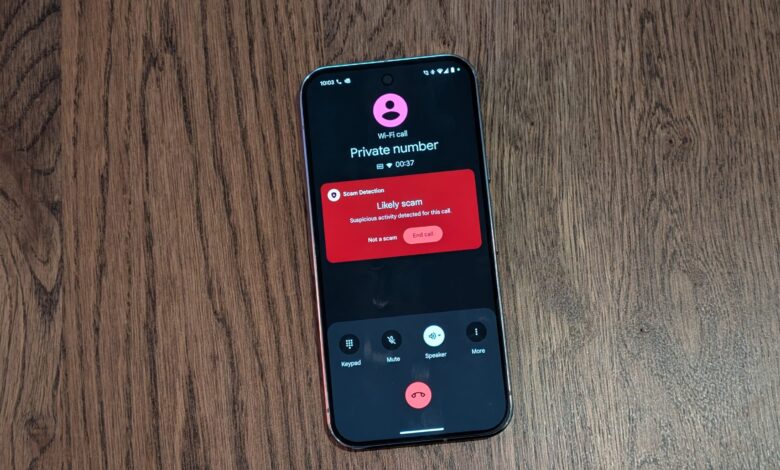
Android is adding a new safeguard against increasingly convincing scam calls, and the warning does not rely on the caller ID alone. The new fake call detection feature in Phone by Google is designed to alert users when a caller may be pretending to be someone saved in their contacts.
That matters because scammers no longer need an unknown number to look convincing. They can spoof a trusted contact’s number and pair it with AI-generated voice imitation, making the call sound like a partner, child, manager, or close friend.
How the detection works
Fake call detection runs automatically in the background, so users do not need to take any extra action when a call arrives. When a trusted contact calls, the phone quietly sends a confirmation signal to the recipient’s device.
If a scammer is spoofing that contact’s number, the signal may not appear. The system then checks the real device tied to that contact, and if that device is not actually on a call, the screen can show a warning that the incoming call may be fake.
Google says the process uses end-to-end encrypted RCS, which keeps the check private. It also means users do not need to answer a quiz, scan a code, or press anything during an incoming call.
Why the timing matters
Impersonation scams have become more personal and more persuasive. INTERPOL’s Global Financial Fraud Threat Assessment for March 2026 identified impersonation fraud as one of the major contributors to more than $400 billion in global losses.
In the United States, impersonation fraud remains one of the top categories reported to the FTC. Losses reached $2.95 billion in 2024, showing how costly these schemes continue to be.
The tactic is usually simple but effective. Scammers use the trust attached to a familiar name on the screen, then pressure victims with urgent stories about accidents, arrests, threats to bank accounts, or emergency requests from a supposed boss.
Who gets access first
Google says fake call detection is rolling out globally in Phone by Google this month, starting with Pixel devices. It is available on Android 12 or later devices that have Phone by Google, Contacts, and Google Messages installed, and it also requires RCS support in Google Messages.
There is one important limitation. The feature only works when both the user and the caller are using Phone by Google.
For many Android users, Phone by Google is already the default calling app. If a phone uses a different dialer, that app can still be installed from the Play Store and set as the default.
What to do when a call feels wrong
A warning on the screen should be taken seriously if a call feels urgent or unusual. If the caller asks for money, gift cards, crypto, account codes, or remote access to a device, the safest move is to end the call immediately.
After that, the right next step is to call back using a saved number or an official number that is already trusted. The caller’s number, links, or instructions should not be used, because those can lead back to the scammer.
Scammers often rely on emotional pressure so targets do not have time to think clearly. The safest response is still the simplest one: pause, verify, and do not let panic make the decision.
A layer of protection, not a complete shield
Fake call detection adds another line of defense, but it does not close every gap. The feature may not work if the other party is not using Phone by Google, and it does not cover every business call, unknown number, or unsupported device.
Android users are also advised to keep Phone by Google, Google Contacts, and Google Messages updated whenever new versions are available. Those updates often bring security fixes, bug fixes, and newer scam protections.
Pixel and Samsung users can also enable Scam Detection in the Phone by Google app to help flag suspicious calls. Tools like these do not replace caution, but they can buy valuable time at the moment it matters most.
The larger change is not only in the technology itself, but also in how scams now operate. When a name on caller ID is no longer enough to prove who is calling, Android is adding one more verification layer before trust turns into loss.