Samsung Galaxy users may have three Google app updates waiting outside the usual Play Store update flow. The affected items are Android System SafetyCore, Android System WebView, and Google Play Services, all of which have new versions that may need to be installed manually in some cases.
This matters because many Galaxy devices come with Google apps preloaded. Even though most updates can be checked through Google Play Store under Manage apps & device, some system apps do not always appear there even after a new version is available.
What to check first
The three updates now rolling out carry different version numbers for each app. Android System SafetyCore is at version 1.0.925574157, Android System WebView is at 149.0.7827.91, and Google Play Services is at 26.22.33.
Google has not provided detailed changelogs for these releases. That is consistent with the usual approach, which means the exact changes inside each update have not been officially described.
How to find the updates manually
Android System WebView and Google Play Services are core components that support many Android functions. Android System SafetyCore also falls into the system app category, which means its update may not always show up in the regular update list.
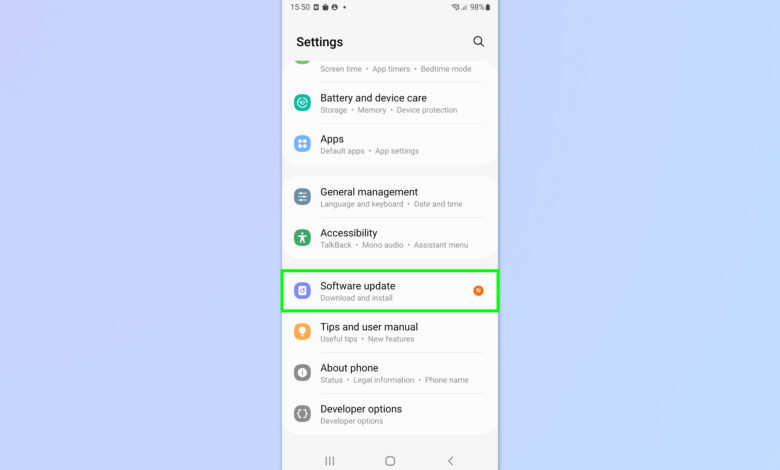
Because of that, users may need to open each app page manually. On Samsung phones and tablets, the process starts in Settings, then Apps, followed by selecting the app that needs to be updated.
After the app page opens, scroll to the bottom and tap App details in store. This will open the app’s page in Google Play Store, where the Update button appears if a new version is available.
| App | New Version |
|---|---|
| Android System SafetyCore | 1.0.925574157 |
| Android System WebView | 149.0.7827.91 |
| Google Play Services | 26.22.33 |
The same steps need to be repeated for the other two apps. In practice, that means checking Android System SafetyCore, Android System WebView, and Google Play Services one by one.
Why the updates are worth installing
Even without changelogs, system app updates usually bring bug fixes. They also tend to include performance improvements, security hardening, and sometimes new features.
That is why updates of this kind remain important to install as soon as they appear. For system components tied to core Android services, new versions often affect stability and everyday usability.
Google Play Services, for example, acts as a foundation for many services on Android phones. Android System WebView also matters when apps load web content inside other apps, so its updates can affect compatibility and smoothness.
Android System SafetyCore may be less familiar to many users, but it is still a system component. For that reason, a new version is still worth checking, especially once Google has started rolling it out.
Availability on Galaxy devices
According to Galaxy Alerts, all three updates have already been released by Google. Their availability has also been confirmed on Galaxy phones running One UI 8.5 or One UI 9 in India.
That suggests the rollout is already reaching at least some Samsung devices. However, because app updates can vary by device and region, some users may still need to check manually before the Update button appears.
For users who assume Google apps are always updated automatically, this is a reminder that not every system component follows the same pattern. Some still require a manual search through the Apps menu in Settings before their Play Store page can be opened directly.
For Samsung owners who want to keep their devices current, checking only the main update list in Play Store may not be enough. A manual review of Android System SafetyCore, Android System WebView, and Google Play Services can be a simple extra step, especially now that Google is rolling out versions 1.0.925574157, 149.0.7827.91, and 26.22.33.