Infinix has officially launched XOS 16, the latest iteration of its custom operating system, now based on Android 16. This update introduces a comprehensive overhaul focusing on smarter AI features, improved gaming performance, and a fresh user interface design. The company aims to deliver a more intelligent, personalized, and efficient user experience for today’s dynamic smartphone users.
The centerpiece of XOS 16 is its revamped interface called Glow Space. Inspired by light layers and spatial depth, this design gives the device screens a vibrant yet balanced visual appeal. Icons are redesigned with a cleaner and more modern look, and transitions between menus flow more smoothly, making daily navigation more comfortable and intuitive.
AI-Powered Personalization and Creativity Tools


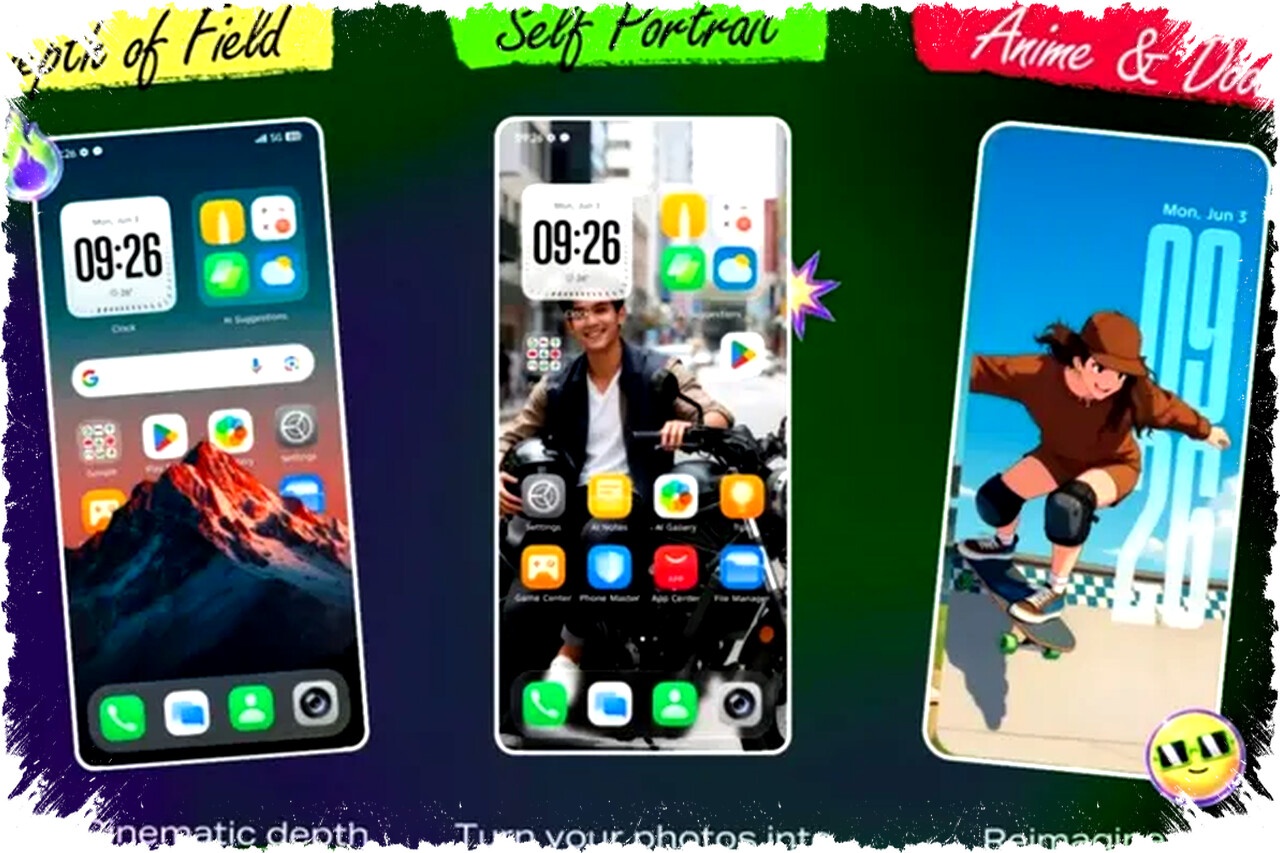
XOS 16 integrates AI deeply into the customization and creative elements of the system. Users can now generate wallpapers and themes through AI-driven tools that work off text or images. There are several novel options available, including AI portrait wallpapers, anime and doodle style transformations, and flexible wallpaper formats to suit individual preferences.
Key AI-based creativity features include:
- Depth of Field effect for cinematic background blur.
- Self Portrait tool that converts photos into 3D wallpapers.
- AI Theme Generator capable of creating themes from user prompts.
- AI Studio suite, which includes AI Eraser, AI Extender, and AIGC Portrait for enhancing images with artificial intelligence.
These tools empower users to personalize their devices extensively and creatively without requiring advanced design skills.
Enhanced Usability under Different Conditions
XOS 16 introduces improvements tailored for everyday usability in various environments. The touch system is now enhanced to boost screen sensitivity and accuracy during rain or when the phone is inside a bag. Additionally, the system recognizes sweaty palms to minimize accidental touches. A unique Motion Sickness Relief Mode aims to increase comfort while using the phone in moving vehicles.
Boosting Productivity with AI Features
Infinix also focuses on productivity with AI-powered shortcuts and content management tools. The One-Tap AI Button instantly accesses over 30 applications and functions, streamlining daily tasks. Flash Memo automatically saves screenshots along with titles, summaries, and tags for easier retrieval.
Additional productivity tools include:
- Ask Folax, which quickly summarizes on-screen content or helps draft texts.
- Mind Hub, a centralized manager for stored content.
- AI Note, converting handwritten notes into visual digital text.
- AI Recording Summary, providing quick outlines of recorded audio.
- AI Call Assistant, delivering real-time call translation and conversation summaries.
These enhancements aim to reduce friction in multitasking and information management.
Optimized Multimedia and Entertainment Experience
For media consumption, XOS 16 introduces YouTube Summary, an AI-driven feature summarizing video content automatically. Video Battery Saver helps extend viewing time by reducing power consumption during streaming. Magic Voice Changer 2.0 allows users to modify their voice with customizable profiles, accessible through voice commands to avoid interruptions.
Gaming Performance Takes a Giant Leap
Gaming enthusiasts receive significant updates via XOS 16’s XBoost Game Mode, which now supports three performance profiles: Performance, Balanced, and Power Saving. These modes allow gamers to balance speed, image quality, and battery life according to their preferences. Frame Interpolation technology ensures smoother visuals by increasing frame rates artificially.
To address heat management, Bypass Charging reroutes power flow to avoid overheating during extended gaming sessions. The platform also features an anti-disturbance mode to block calls and notifications, while the GameShift Zone provides quick access to gaming tools and settings.
Battery Management and Modern Connectivity Features
XOS 16 introduces Battery Self-Repair to slow down battery deterioration over time, extending the device’s lifespan. Bypass Charging delivers electricity directly to the system during heavy use, maintaining performance without overheating.
Connectivity enhancements include Touch Transfer for iPhone users via NFC, enabling offline photo sharing, including Live Photos. The operating system also supports capturing Live Photos natively, allowing users to record moments with subtle motion.
Additional Utilities and Security Features
To complement multitasking, XOS 16 offers Floating Window and Split Screen modes. An IR Blaster is included for remote control functions over compatible electronic devices. The Find My Phone feature remains operational even if the SIM card is removed, increasing security against theft.
Rollout Schedule and Availability
Infinix confirms that XOS 16 will come pre-installed on forthcoming devices, while eligible existing models will receive phased updates. A detailed list of supported devices and rollout timelines will be provided by the company in the near future.
This system update highlights Infinix’s effort to integrate advanced AI capabilities and optimize performance for a next-level smartphone experience, reinforcing its position in the competitive Android ecosystem.